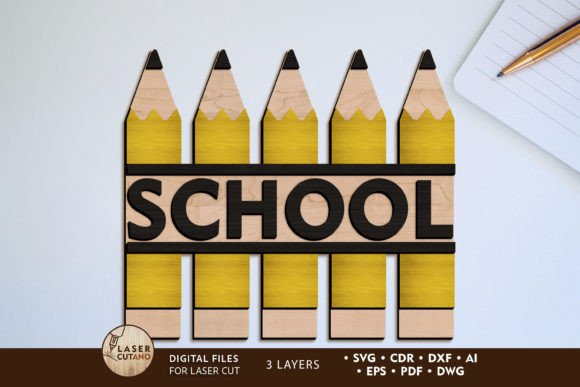
Creative School Projects with Pencils Decorative Laser Template
Bring a charming, educational flair to your next crafting or design project with the Pencils School Decorative Template. This versatile digital file is more than just a simple graphic; it's a complete multilayer layout designed specifically for cutting machines like laser cutters and CNC routers. Perfect for educators, parents, and crafters, it offers a unique way to create personalized back-to-school decor, gifts, and learning aids that stand out with a polished, handmade aesthetic.
The true value of this asset lies in its flexibility and professional preparation. Upon purchase, you receive a downloadable .zip file packed with industry-standard formats—.AI, .SVG, .DXF, .DWG, .CDR, .EPS, and .PDF. This ensures seamless compatibility with virtually any design software or cutting machine, from Glowforge and xTool to Cricut and others. The design is optimized for 3mm thick materials like plywood, MDF, acrylic, or plexiglass, allowing you to create sturdy, dimensional pieces. While the base size is 5 x 7 inches, you can scale it up for wall art or down for intricate accents, though careful consideration is needed when reducing to preserve fine details.
Practical Applications for a Polished Look
This template excels in projects where a thematic, decorative touch is needed. Its layered design creates depth and visual interest once assembled and painted, making finished products look incredibly detailed and professional. Consider these use cases:
- Classroom & Home Decor: Create welcome signs, nameplates, or motivational wall art for a classroom, playroom, or study area.
- Personalized Gifts: Craft unique back-to-school gifts for teachers or students, such as custom desk organizers or decorative bookends.
- Event Decorations: Design charming centerpieces or photo booth props for a school open house or graduation party.
- Small Business Merchandise: If you run an Etsy shop or local craft business, this file allows you to produce and sell finished physical items, expanding your product line with a popular educational theme.
Tips for a Successful Project
To get the best results, follow a few practical guidelines. Always unzip the downloaded folder before attempting to use the files. When working with the multilayer design, it's recommended to paint each individual layer before gluing them together. This prevents messy seams and ensures a clean, professional finish. For color, you can use a classic school palette of yellows, reds, and blues, or opt for modern neutrals like white and birch for a more contemporary look that fits modern typography trends.
Choosing the right design assets, like this template, is key to elevating your creative work. It saves significant time compared to designing a complex multilayer file from scratch, while still offering complete creative control over material and color choices. The result is a high-quality, custom piece that enhances any space or serves as a thoughtful, personalized gift. It’s a perfect example of how a well-crafted design resource can streamline your workflow and help you achieve consistently impressive, professional-looking results.